Search
Modern ergonomic workstation with an office chair, organised desk and productivity-focused workspace designed to support employee comfort and efficiency.

7 Ways Office Furniture Can Improve Employee Productivity

A productive workplace relies on more than motivated employees. Office furniture, workspace planning and layout all influence how comfortably and efficiently people can carry out their daily tasks. 

Rather than viewing furniture as a standalone purchase, it's worth considering how desks, seating, storage and collaborative spaces work together to support different ways of working. 

Whether you're updating part of your office or planning a complete refurbishment, thoughtful planning can help you make better long-term decisions. If you're considering a workplace upgrade, at Wave Office, we have plenty of office design build services to help create a workspace tailored to your business and the way your team works. 

Why Office Furniture Matters For Employee Productivity

Employee working comfortably at an ergonomic desk in a modern office while colleagues collaborate nearby, showing how office furniture supports employee productivity.

Office furniture helps employees work more effectively by supporting comfort, organisation and collaboration within a well-planned workspace.

Employees interact with desks, chairs, storage and shared spaces throughout the working day. When these elements are planned around daily tasks, work becomes easier to organise and teams can move more efficiently between focused work and collaboration.

Furniture should support how people work rather than simply fill available space. Replacing individual items without reviewing the overall layout may solve one issue while creating another.

Before investing in new furniture, consider:

  • How employees move around the office.
  • Which teams collaborate most frequently.
  • Whether there are enough quiet spaces for focused work.
  • If storage meets current working practices.
  • How the workspace can adapt as the business grows.

Taking a strategic approach helps businesses create an office that supports day-to-day operations while making better long-term use of their furniture investment.

Ergonomic Office Chairs Improve Comfort And Focus

Adjustable office chairs help accommodate different users, making it easier to work comfortably throughout the day.

No single chair suits every employee. Differences in height, role and working style mean seating should allow users to adjust their workstation to meet individual requirements. Features such as lumbar support, seat height adjustment and adjustable armrests help employees achieve a comfortable working position while supporting Display Screen Equipment (DSE) assessments.

This flexibility is particularly valuable in hybrid offices where multiple employees may share the same workstation throughout the week. Chairs that can be adjusted quickly allow each user to tailor the setup before starting work.

When choosing office seating, consider:

  • Seat and backrest adjustability.
  • Lumbar and armrest support.
  • Compatibility with desk height.
  • Shared or assigned workstations.
  • Durability for commercial use.

Replacing every chair at once may not be necessary. Many businesses prioritise departments where employees spend the most time at a desk before introducing improvements across the wider workplace.

Office chairs deliver the greatest value when considered alongside desks, monitor positioning and workspace layout. Taking a wider planning approach helps create workstations that support employees' daily tasks while making better long-term use of your furniture investment.

Adjustable Desks Support Flexible Working Styles

Height-adjustable desks allow employees to adapt their workstations to suit different tasks and personal preferences.

Modern offices rarely operate in exactly the same way they did a decade ago. Hybrid working, flexible schedules and shared workstations have changed how businesses use office space, creating greater demand for adaptable furniture.

Height-adjustable desks give employees the option to alter their working position throughout the day according to personal preference or the task they're completing. While research continues into the wider effects of sit-stand working, these desks primarily provide flexibility rather than guaranteed productivity improvements.

They can also simplify workstation setup within hybrid environments. Employees using hot desks can adjust the desk to suit their preferred working position without requiring separate furniture for each individual.

Businesses considering height adjustable desks should think beyond the desk itself. Monitor positioning, cable management, power access and storage all contribute to creating a workstation that functions effectively.

Questions worth considering include:

  • Which employees would benefit most?
  • Will desks be permanently allocated or shared?
  • Is there sufficient cable management?
  • Does the surrounding layout provide enough movement space?
  • Can existing storage integrate with new desks?

Taking a broader planning approach helps ensure adjustable desks fit naturally into the workspace rather than becoming standalone features.

Better Desk Layouts Help Teams Work More Efficiently

Even the best furniture cannot compensate for a poor office layout. A well-planned workspace improves movement, supports communication and gives employees the flexibility to work in ways that suit their roles.

The way desks, meeting areas and shared spaces are arranged has a direct impact on how easily employees complete everyday tasks. A layout designed purely to maximise capacity can create bottlenecks, increase distractions and make collaboration less efficient.

Before changing your furniture, review how teams use the office. Customer-facing departments may benefit from sitting together, while finance, HR or administrative teams may need quieter areas for focused work.

When planning desk layouts, consider:

  • Clear circulation routes throughout the office.
  • Team neighbourhoods that encourage collaboration.
  • Separate areas for focused work and informal meetings.
  • Enough space around desks for comfortable movement.
  • Flexibility to accommodate future growth or changing team structures.

Hybrid working also influences layout decisions. Shared desks, touchdown spaces and collaborative zones can help businesses make better use of available space while adapting to changing occupancy levels.

Reviewing your office layout before purchasing new furniture helps ensure every workstation, meeting area and shared space supports the way your business operates, delivering greater long-term value from your investment.

Storage Solutions Reduce Workplace Clutter And Distractions
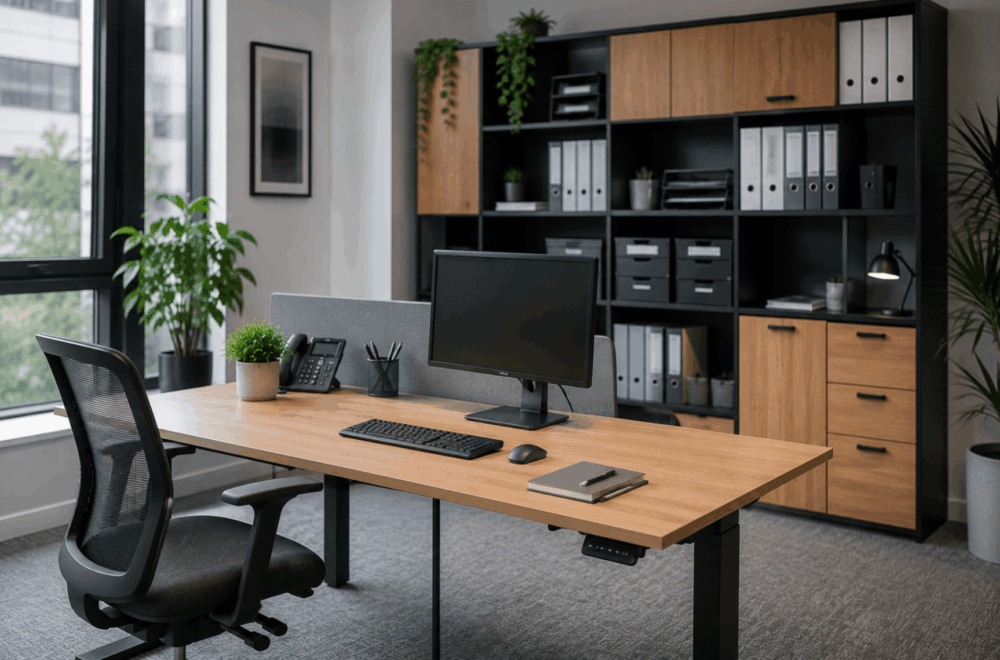
Organised office workspace with built-in storage cabinets, shelving, filing systems and a tidy desk that helps reduce workplace clutter and distractions.

Accessible storage helps keep workspaces organised and allows employees to spend less time managing paperwork and equipment.

An organised workspace makes daily tasks easier to manage. Searching for files, moving equipment between desks or working around unnecessary clutter can interrupt workflow and reduce the usability of the office.

The right storage solution depends on how your business operates. A workplace using assigned desks may benefit from personal pedestals and filing cabinets, while hybrid offices typically rely more on shared storage, lockers and centralised filing systems.

When reviewing storage requirements, consider:

  • How frequently documents need to be accessed.
  • Whether employees require personal or shared storage.
  • Security requirements for confidential information.
  • Storage for laptops, peripherals and personal belongings.
  • Future changes in staffing or office layout.

Mobile pedestals can provide flexibility where teams regularly move between workstations, while lockers help support desk-sharing by giving employees a secure place to store personal items throughout the day.

Storage should also complement the office layout. Placing cupboards, shelving and filing systems close to the teams using them reduces unnecessary movement without creating obstacles within circulation routes.

Reviewing storage during an office refurbishment can also identify opportunities to reduce underused cabinets, free up valuable floor space and create a cleaner working environment without increasing the overall office footprint.

Acoustic Office Furniture Helps Improve Concentration

Acoustic furniture can help reduce everyday distractions by creating quieter areas for focused work and private conversations.

Modern offices frequently combine collaborative working with individual tasks, creating competing demands within the same space. While open-plan layouts encourage communication, they can also generate background noise that makes concentration more challenging.

Acoustic furniture provides businesses with additional options for managing these environments. Rather than altering the building itself, products such as acoustic screens, privacy booths and meeting pods create dedicated spaces for activities requiring greater separation from surrounding office noise.

Depending on workplace requirements, businesses may consider:

  • Desk-mounted acoustic screens.
  • Freestanding acoustic panels.
  • Phone booths for private calls.
  • Meeting pods for small group discussions.
  • Enclosed collaboration spaces.

These solutions should be viewed as part of a wider workspace strategy rather than standalone fixes. Furniture cannot eliminate every source of workplace noise, although thoughtful planning can help separate quieter work from more collaborative activities.

For example, locating phone booths away from open desk areas allows employees to take video calls without disturbing colleagues, while small meeting pods reduce pressure on larger meeting rooms for short discussions.

Businesses should assess how employees currently use their workspace before investing in acoustic furniture. Understanding where distractions occur provides a stronger foundation for selecting suitable solutions.

Collaborative Furniture Encourages Better Team Communication

Flexible meeting furniture gives teams spaces that support collaboration without disrupting employees carrying out focused work.

Not every conversation belongs around a workstation. Providing dedicated areas for meetings, project discussions and informal catch-ups allows collaborative working to take place without interrupting colleagues completing individual tasks.

Meeting spaces no longer need to follow a single format. Different activities require different environments, making flexibility an important consideration during furniture selection.

For example:

  • Formal boardrooms suit presentations and client meetings.
  • Smaller meeting tables support project discussions.
  • Soft seating encourages informal conversations.
  • Modular furniture allows layouts to adapt for different group sizes.
  • Breakout tables provide spaces for quick collaboration throughout the day.

Choosing the right furniture begins with understanding how employees interact. Organisations holding frequent client meetings may prioritise larger meeting rooms, while creative teams may benefit from adaptable collaboration spaces that support workshops and brainstorming sessions.

Furniture should also allow spaces to evolve. Modular seating, mobile tables and reconfigurable layouts help businesses respond to changing team structures without requiring major refurbishment work every time requirements change.

Investing in flexible collaboration spaces can also reduce pressure on formal meeting rooms by providing alternative locations for shorter discussions and everyday teamwork.

Comfortable Breakout Areas Support Employee Wellbeing And Motivation

Breakout spaces provide employees with alternative environments for informal meetings, breaks and collaborative working throughout the day.

A productive workplace includes more than desks and meeting rooms. Employees also benefit from having spaces where they can step away from their workstation, hold informal conversations or work in a different setting when appropriate.

Breakout areas vary considerably between organisations. Some businesses create café-style environments, while others introduce lounge seating, high tables or quieter relaxation spaces depending on available space and working culture.

When planning a breakout area, consider:

  • How employees currently use communal spaces.
  • Whether the area will support informal meetings.
  • The balance between collaboration and relaxation.
  • Proximity to working areas.
  • Future flexibility if office requirements change.

Well-designed breakout spaces also help make better use of underutilised areas within the office. Rather than leaving awkward corners unused, businesses can create welcoming environments that support a wider range of workplace activities.

Furniture selection should reflect expected use. Durable finishes, comfortable seating and practical table layouts all contribute to creating spaces that employees are more likely to use throughout the working day.

As with every other part of the office, breakout areas work best when considered during the overall workspace planning process rather than added as an afterthought.

Before You Invest In New Office Furniture

Replacing furniture delivers the greatest value when it forms part of a wider workplace strategy rather than a series of isolated purchases.

Before making any investment, ask yourself:

  • Does the current office layout still support the way your teams work?
  • Which furniture creates the biggest day-to-day challenges?
  • Are there opportunities to improve flexibility for hybrid working?
  • Can existing furniture be retained alongside new products?
  • Will today's decisions still meet your needs in three to five years?

Answering these questions helps prioritise investment where it will have the greatest practical impact while avoiding unnecessary expenditure.

Working with an office furniture and workspace planning specialist can also help identify opportunities that may not be obvious when reviewing individual products in isolation.

Frequently Asked Questions

Does office furniture affect productivity?

Office furniture can support productive ways of working by improving comfort, organisation and flexibility within a well-planned workspace. While furniture alone does not increase productivity, choosing solutions that suit your employees and daily operations can remove unnecessary obstacles.

What furniture should businesses upgrade first?

Start with the furniture employees use most. Desks and office chairs are usually the priority, followed by storage, meeting areas or collaborative spaces. A workspace review helps identify where investment will have the greatest impact.

Are ergonomic chairs worth the investment?

Adjustable office chairs allow employees to tailor their seating position to their individual needs. They are particularly beneficial in offices where people spend long periods at a desk or where workstations are shared between multiple users.

How do office layouts affect teamwork?

A well-planned layout makes communication easier while providing dedicated areas for focused work, meetings and collaboration. Balancing these spaces helps teams work more effectively without creating unnecessary distractions.

What furniture works best for hybrid offices?

Hybrid workplaces benefit from flexible furniture such as height-adjustable desks, shared storage, lockers, modular meeting furniture and collaborative spaces. The right combination depends on how frequently employees use the office and how the workspace is organised.

Should businesses replace all office furniture at once?

Not necessarily. Many organisations achieve better value by upgrading the areas that need attention first before introducing further improvements as budgets and business requirements evolve.

Creating a productive workplace starts with understanding how people work rather than selecting furniture from a catalogue. Office layouts, storage, seating, collaboration spaces and flexible workstations all contribute to an environment that supports everyday tasks when planned as part of a complete workspace strategy.

Whether you're refreshing a single department or planning a full office refurbishment, taking time to assess your team's requirements can help you make informed investment decisions that continue to support your business as it grows.

If you're looking to create a workspace that better supports your team, contact the Wave Office team through our contact us page to discuss office furniture, workspace planning, office design solutions and much more, tailored to the way your business works.


gmail

Advice on managing a busy email inbox 

Prevent your inbox from becoming another full-time job use these tricks and tips to keep the chaos at bay and, instead, adopt healthy email management practice

Email is often the primary mode of business communication, and with good reason; it can be a quick and effective way to complete tasks such as scheduling and providing status updates to your team. However, if you don’t follow healthy email management practice, it can seem like your inbox is the one managing you. 

While email is a great form of communication, it shouldn’t be all-consuming. Here’s how to break unhelpful habits and create a healthier, more efficient, relationship with email.

Develop an email schedule

Many people consider achieving inbox zero to be the ultimate email management success; the goal becomes to keep your inbox clean at all times and regularly check for new emails but while checking your email may feel productive, it can actually take time and focus away from other, more important, work tasks. If you want to reduce workplace distractions, and become more productive, ditch this concept and create a schedule to limit the time spent reading and responding to emails. This will minimise the interruptions that derail your productivity on important tasks and ensure that you are setting aside adequate time for them.

There is no rule for what type of schedule works best; if you aren’t sure how often you need to check your inbox, try looking at it at three designated times each day for a week or other fixed amount of time. Reduce this time the following week until you find the minimum amount of time you need to adequately respond.

Managing expectations and creating boundaries are important aspects of creating an email schedule. Make sure clients and co-workers are aware of the new schedule by setting up an automatic response with your email host or adding your email response times to your signature. This way, people who are accustomed to instant replies won’t be surprised or offended if you take three hours to respond instead of three minutes.

Organise content in folders

We often rely on email for important work history information but, with the number of emails most of us receive daily, finding a message you need can feel like searching for a needle in a haystack. Among the respondents in a Mail Manager survey, 73% said they spent too much time searching for emails so it’s no wonder that 70% of the same group felt email was a large drain on overall productivity. 

One of the easiest ways to save yourself a headache is to develop a robust email organisation system. Create folders for timely emails or informative messages to keep your inbox clean and manageable. If you work for a company that has several departments, it might be beneficial to organise your account by department, with subfolders for time-sensitive material. You can also create folders for recurring projects or events. 

Unsubscribe from email chains

An integral part of the email organisation process is the magic of the unsubscribe link. It’s easy to become inundated with offers from companies and vendors by signing up for their lead magnets but if their subsequent correspondence only adds to your email backlog, it might be time to unsubscribe. Be ruthless with this; marketers know they need to earn subscribers’ attention, and your subscription is a privilege.

If creating an email schedule and implementing a strict organisation policy doesn’t make your inbox more manageable, it may be time to consider an email management tool. Some apps allow you to mass unsubscribe from newsletters and other things that are clogging up your inbox.

Pre-schedule messages when appropriate

Schedule-sending features can make email management easier both for you and the people who receive your messages. For instance, let’s say you’ve got a big client meeting coming up; you can draft and schedule your follow-up email ahead of time so that you don’t have to worry about remembering to send your presentation afterwards.

Or you might have an important email you want to get off your desk, but you didn’t draft it until end-of-day Friday. You can schedule it to hit your co-workers’ inboxes first thing on Monday so that you all can enjoy the weekend. Email scheduling can show that you respect your colleagues’ time as much as your own. 

Clear the clutter

Past emails can be helpful when you want to retrace your steps in a conversation, but you don’t need to keep every little message. Yes, conversations about action items will help down the line but an email confirming that the team meeting was moved from 2:30 to 3:00 p.m maybe not as important. Regularly delete the emails you don’t need to keep so it’s easier to search your inbox when you need something important. 

Set email reminders

One of the reasons people read emails as soon as they receive them is to avoid accidentally forgetting about them later. Let your email platform do the work of remembering for you so that you can focus on your highest priorities. 

Some platforms will allow you to mark and set timed reminders for specific messages. If you can sync your calendar with your email platform, you may also be able to create an event from an email. This can be especially helpful if your response requires some extra thought and you need to block time on your calendar to address it.

Turn off notifications

If you’re working on a task, and in a state of flow, the last thing you want is to be interrupted. When you’re inundated with pinging sounds and pop-up notifications every time you get a new email, maintaining focus can be an uphill battle. Disabling notifications can help you stick to your designated email-checking schedule and this will also eliminate the temptation to answer emails outside of working hours.

Three people working together

Encouraging productivity in a hybrid work environment

Annemarie Estess explores the impact of a hybrid work environment and how to encourage productivity for employees working from home 

Back in November 2020 when I asked my coaching clients how they were doing with working from home, they described some highlights ‘I guess I sleep a bit more’ and lowlights ‘We’re struggling for space and getting cabin fever’ of the experience, but ‘lonely’ was the overtone. 

I spoke then with people aged 20s-to-60s, graduates to executives, across varied industries and roles. Their circumstances varied but they all described feeling more alone than usual. They were also unsure of what to do about it when the reality was that they were likely to continue to work from home, with no defined end in sight, against the backdrop of the pandemic.

Even though most people logically understood how extraordinary these circumstances were, many were still convinced they were doing something wrong, that it was a failure of their time management or productivity skills, somehow, if they didn’t feel as fired-up and connected to work as they once did. When we zoom out (no pun intended) and look at the trajectory that work has taken for many organisations and staff since 2020, our loneliness, and uncertainty about how to address it, is not surprising. Working from home used to be an exceptional arrangement, something we might have longed for, or tried to get approval for here-and-there as a perk; now, in 2022, ‘hybrid working’ is on everyone’s lips.

A report by the Office for National Statistics in 2019 showed that the number of employees working mainly from home was around five per cent. That figure jumped to about 49% of employees working mainly from in June 2020. These figures are pretty striking. They remind us that we were in uncharted waters as a workforce and, to some extent, we still are. It’s no wonder so many of us may, even now, be feeling adrift and unsure of how to work well at a distance. Of course, some people are loving being based at home but others aren’t so happy, for various and valid reasons.

Wherever you find yourself on that spectrum, it’s fair to say that we’re still collectively in a living experiment about how we can remain connected, engaged and motivated about work without having meaningful, in-person interactions with colleagues every working day.

Here I’m sharing food for thought and approaches that I’ve picked up from clients and colleagues, various podcasts that discuss work fulfilment and engagement amid the pandemic, and my own experimentation of home-working habits. All of them revolve around the same key idea how to make our contact with each other more regular, more honest, more fun and more human.

Bring back the ‘coffee-machine chatter’ when working from home

We may have never expected to miss small talk while waiting for the kettle to boil, but the in-between-meeting moments, and informal conversations, seem to be missed a great deal. Allow a few minutes to, quite literally, sit and chat over a beverage. Even five minutes at the start or end of a one-to-one or team meeting can go a long way to building positive attachment in the team, broadening our base of trust and comfort with each other.

As counterintuitive as it may sound, structure in ‘unstructured’ time with your colleagues

Yes, many of us are coping with meeting fatigue and might groan if someone were to suggest another video call, but we shouldn’t underestimate how powerful it can be to have a ‘phone or video chat where we catch up as people, beyond the scope of work.

If you’re in charge of a recurring meeting, start it with a short check-in

This can involve asking people to name a word or a couple of sentences about their headspace that day. It’s a chance to get a temperature check on how people are doing when we aren’t otherwise getting much interaction with each other.

If you’re a leader or manager working from home, do what you can to give practical support

This might mean flexing a colleague’s working hours to accommodate caretaking responsibilities and facilitating team conversations to gauge where people can tag-team tasks so they aren’t feeling isolated and buried.

Broaden your support base beyond work

Many people I’ve spoken with, particularly those in senior leadership positions, recognise that they need to be able to let down their guard and connect with people who aren’t colleagues. They need somewhere independent and external to get support. Seeking out people and forums friends, family, networking groups, training programmes, professional support like coaching and therapy can give us a more dynamic, broader base of support while working from home.

Listen out for what people are finding difficult about working from home and what they’re finding helpful

You might find a grab-bag of various strategies people are coming up with to stay motivated, engaged and healthy while working from home. If you’re a leader in the organisation, these strategies can be compiled and shared informally or formally.

These approaches won’t replace what we get from being side-by-side with each other, able to organically strike up chat, gauge each other’s moods, stroll to get tea and share stories of the weekend, but they can be part of the important work to revitalise our sense of connection to colleagues, to our work, and to ourselves as hybrid working becomes more and more the ‘new normal’.

time management

A SIMPLE & EFFECTIVE TIME MANAGEMENT TECHNIQUE

Finding it difficult to get through your workload without losing concentration or feeling overwhelmed? Try using this technique to help you break your task list down.

The Pomodoro Technique (so called due to the tomato shaped timer used to create the technique) was created by Franceso Cirillo in the 1980's and helps you to divide your work day into manageable chunks. It blocks your working time into 25 minute segments followed by a short, five minute break.

How and Why It Works

Great for helping the mind to stay focused and productive, the Pomodoro Technique helps you to take advantage of the average 25 minute attention span that most people possess. The five minute break helps the mind to stay refreshed and avoid burn-out and fatigue. The break also helps to improve concentration and productivity during the 25 minute working segment. You can use the Pomodoro Technique to maximise your performance on both short and long task lists. Shorter Tasks and Lists - A long to-do list of short jobs can seem overwhelming and finding the motivation to organise the list and start work can cause feelings of frustration or overwhelm. Breaking the list down into manageable 25 minute chunks can make the list seem less daunting and help you to start making progress. You will also work faster as you will want to avoid carrying a piece of work over into your next 25 minute block if you can help it. Great for stopping procrastination! Longer Tasks and Lists - Avoid boredom, frustration and lack of concentration by dividing your list up. Breaking the list down into 25 minute work blocks can keep stress at bay and improve the quality of your work.

How to Put This Technique Into Practice

Find a timer - Either a physical timer or a phone timer will work. A phone timer can be better if you are working in an office with other people as you can set it to vibrate to avoid distracting others. Use your five minute break wisely - Use this time to look away from your screen to help avoid tired eyes. Get a drink, stretch and try to move around. Keeping hydrated and keeping your blood flowing will also help to keep you refreshed and able to concentrate. Take a 15 minute break after four timed working segments. Clear your head by going for a brisk walk or chatting to a colleague.   Try applying this technique next time your workload begins to overwhelm you and see how the results help you.     [yikes-mailchimp form="1" title="1" description="1" submit="Sign Up"]
decluttered desk

HOW TO DE-CLUTTER YOUR DESK & CREATE A MORE PRODUCTIVE WORK AREA

Tidy Up Your Work Surface:
  • Throw away any general waste and recycling
  • Gather any loose paper, documents etc and sort into "Working  On", "To File" and "Shred & Recycle" piles
  • Look through old binders and folders - can you throw any of their contents away and re-organise?
  • Are there multiples of supplies covering your work surface? I.e more than one stapler, hole punch etc
De-Clutter the Inside of Your Desk Drawers:
  • Empty out any rubbish or recyclables
  • Put any loose change into a jar, pot or your wallet/purse
  • Take out anything you haven't used for more than a couple of months
Organise Paper Items and Documents:
  • Go through current files and documents and sort in order of priority
  • Try to locate digital copies of the files you are keeping - save a copy on to a memory stick as well as your hard drive and throw the physical hard copy away
Organise Your Filing Cabinet:
  • Remove any files/documents you are sure that you no longer need
  • Update the filing system with a proper labeling system that works for you
  • Place similar or related documents into a folder and then file
Memos, Sticky Notes and Business Cards:
  • Enter any business card details into your contact software or spreadsheet and then dispose of
  • Try using digital sticky notes or web-based memo apps
  • If you prefer to work with paper and pen, keep a small notebook for your memos
[yikes-mailchimp form="1" title="1" description="1" submit="Sign Up"]
work-place-creativity

THE IMPACT OF OFFICE FURNITURE ON CREATIVITY AND PRODUCTIVITY

January, and indeed, the first few months of the year are always hard. Chances are your employees are only just beginning to get back into the swing of things outwardly. They’ve remembered all their passwords and their diary is now full and organised after a week’s worth of blindly fumbling through the workday. However, they’re probably still sluggish, a little upset that they’re not still at home in their PJs stuffing Quality Street. There’s nothing much to look forward to in January and absences are likely to be pretty high with colds spreading like wild fire around the office oh,  and probably everyone is unashamedly suffering from a little bit of SAD (Seasonal Affective Disorder) now that Christmas is gone and it’s freezing! So, productivity and creativity definitely need a very big boost…but how? The good news is, you don’t need to become a master of psychology and you don’t need to plan any team building days people are still struggling to get out of bed be gentle! The set up of your office and the equipment and furniture available is one of the easiest ways to help boost productivity and get those creative brains back into gear. Communication can also be greatly improved with the correct office layout and communication means more ideas and better morale! Here’s a couple of facts for you: Comfortable, well-lit and well-ventilated offices see an increase of up to 16% in productivity, 24% in job satisfaction and a notable decrease in absenteeism The average person wastes 4.3 hours per week searching for papers and documents, causing stress and confusion and heavily impacting productivity Ergonomic chairs, such as the patented, chiropractor approved, Chiro Plus Ultimate, help to  decrease back, neck, shoulder and pelvic pain and help to prevent musculoskeletal disorders which are a leading cause of lost work days in the UK. The correct chair boosts productivity by increasing oxygen flow to the brain, improving circulation and alleviating distracting aches and pains Aside from these points, the layout of your office should also be considered. Is every department in the right place? Does everyone have access to the things they need, i.e the right files to hand? The lighting of the office or workspace is incredibly important but it also seems a daunting and expensive component to change if it is not right. Natural light is best, with the addition of task lighting, i.e lamps, for reading and note taking making it even better. Overhead lighting is the most popular choice but it is also the worst form of lighting, contributing to headaches, eyestrain and fatigue. However, changing the lighting doesn’t need to be as scary as you think and there are plenty of options to improve this area of your office without complete upheaval. The culture of your company can easily be improved by generally brightening up the area or providing an area for breaks that properly allow for a brain recharge! Relax, you don’t have to get all Google about it and put slides and ball pits into the mix. Rest and play areas are easily created and have a massively positive impact on morale. These breakout areas can strengthen working relationships and allow employees to feel refreshed and productive. These areas are also great for particularly corporate offices that have many important visitors or wish to portray a strictly professional demeanor. Hide them away in “staff only” sections of your office and even utilise the space to remind people of company values through adding aesthetic signs, quotes and images to walls. So, if you feel your office needs a little pick me up, or you think that the benefit of happy, productive and creative staff is invaluable then give Wave Office a call. With years of experience in refurbishing offices, designing and planning space, as well as providing furniture that is specifically tailored to the needs of your workplace, we’re confident that we can get your office out of the January Blues and into a prosperous 2015!
Product has been added to your cart